Central Economy editor
A DayZ server’s loot, events, and player spawns are controlled by a set of XML files — the Central Economy — and hand-editing them is error-prone: one unknown category or typo’d tag and the mission silently misbehaves. DayZ Labs gives you a built-in editor for those files that understands the format, checks your work as you go, and keeps a safety net of backups.
You open it from Economy in the app’s left navigation (under SERVER). It opens in its own window so you can keep editing while the rest of the app is in view.
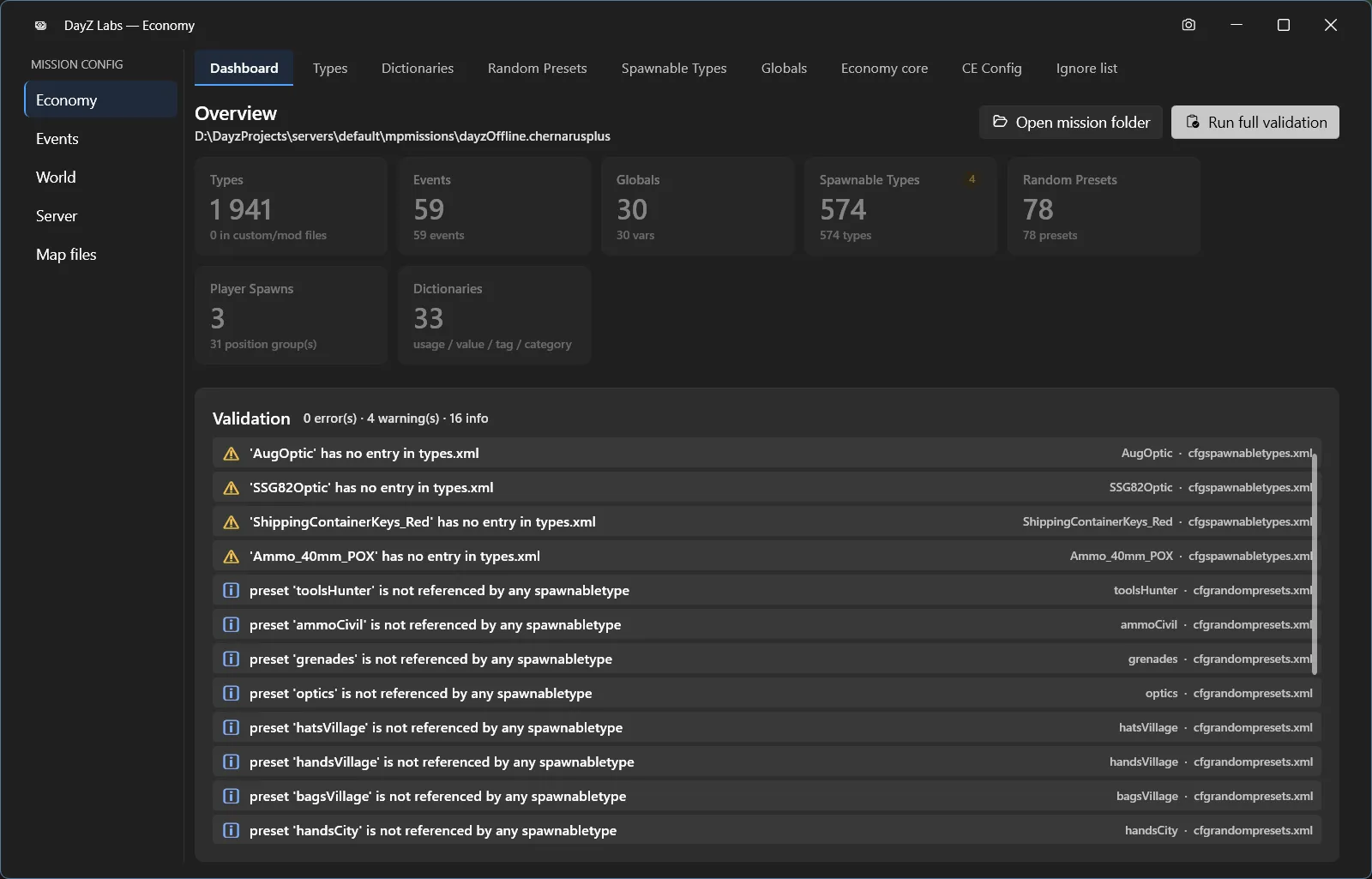
The Economy window: a Dashboard with live counts and a validation list, plus a tab for each kind of CE file.
The Dashboard
Section titled “The Dashboard”The Economy window opens on a Dashboard that gives you the whole picture at a glance: live counts of your Types, Events, Globals, Spawnable Types, Random Presets, Player Spawns, and Dictionaries, alongside a validation list.
That validation list collects everything the editor noticed across your files — split into
errors, warnings, and info — so problems are visible before you ever launch the server.
A Run full validation button re-checks the entire economy on demand. The editor lints each
entry against the mission’s own cfglimitsdefinition vocabulary and flags unknown categories,
duplicate names, and structural problems that DayZ would otherwise swallow silently.
Editing each kind of file
Section titled “Editing each kind of file”A row of tabs along the top takes you to a dedicated editor for each part of the economy:
- Types — your
types.xmlloot table: spawn counts, lifetimes, tiers, and categories. - Dictionaries — the limit definitions that everything else is checked against.
- Random Presets — cargo and attachment loot groups.
- Spawnable Types — what gear items and infected spawn with.
- Globals — mission-wide economy settings.
- Economy core — the master switches for which CE systems run.
- CE Config — the file list that ties the economy together.
- Ignore list — entries you want validation to skip.
A left rail groups your files by area — Economy, Events, World, Server, Map files — so it’s easy to jump between the loot table, the events file, world data, and the server’s own config without hunting through folders.
Each entry is labelled by where it came from — vanilla, a mod, or your own custom value — so you always know what you’re changing and won’t accidentally clobber someone else’s content.
Your safety net
Section titled “Your safety net”Every edit snapshots the file before writing, and the editor keeps the most recent versioned backups. So if a change doesn’t pan out, the previous version is still there to roll back to — you’re never one bad save away from a broken mission.
Power users and automation
Section titled “Power users and automation”Everything above is point-and-click in the app. If you script your workflow or drive DayZ Labs
from an AI agent, the bundled MCP server and the CLI can also list, edit, lint, and restore your
types.xml — handy for batch checks in CI or letting an assistant fix entries for you. That’s an
optional extra on top of the editor, not the way most people work.
DayZ Labs (dzl) is an unofficial, community-made tool, not affiliated with or authorized by Bohemia Interactive a.s. Bohemia Interactive, ARMA, DAYZ, ENFUSION and all associated logos and designs are trademarks or registered trademarks of Bohemia Interactive a.s.