Central Economy
The Central Economy (CE) is the set of XML files that control how DayZ spawns loot, runs events, and places players on your server. DayZ Labs ships a full visual editor for it, so you can change spawn numbers, lifetimes, events and more without hand-editing XML.
Every change is checked (linted) and backed up automatically, so it’s safe to experiment.
Opening the editor
Section titled “Opening the editor”In the tray app’s left navigation, under SERVER, click Economy. The editor opens in its own window so you can keep it side by side with the game or your logs.
It works on the Central Economy of your active server instance — the one marked as in use under Servers. Switch servers there first if you want to edit a different one.
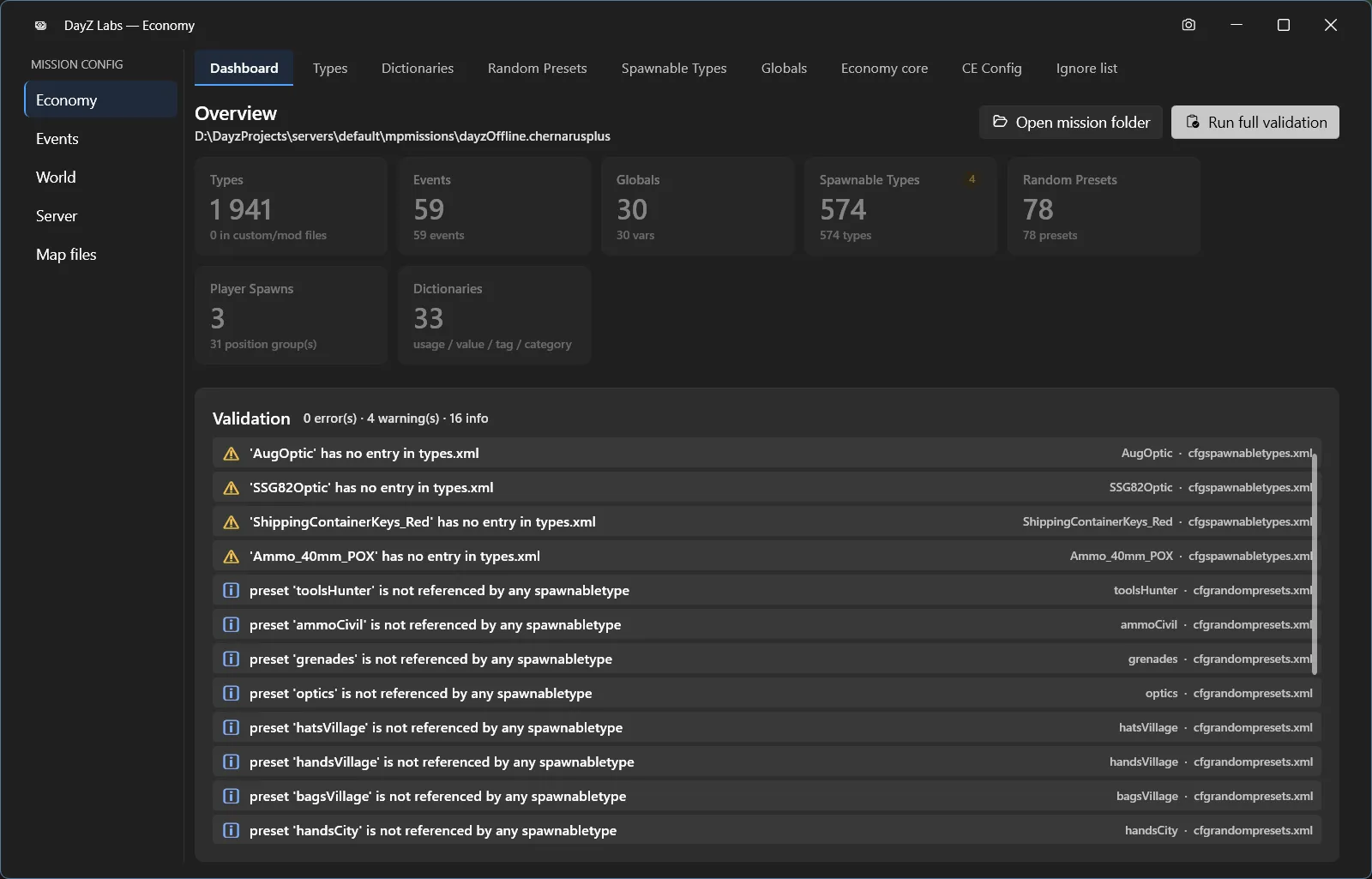
The Economy editor opens in its own window, with a left rail of file groups and a tab per CE file.
The Dashboard tab
Section titled “The Dashboard tab”The editor opens on the Dashboard. It gives you an at-a-glance overview of the whole Central Economy:
- Counts — how many Types, Events, Globals, Spawnable Types, Random Presets, Player Spawns, and Dictionaries your mission has.
- A validation list — any problems found in your files, grouped as errors, warnings, and info.
- A Run full validation button — re-scans every CE file and refreshes the list. Run this whenever you want to double-check your work, especially before launching the server.
If the validation list is empty (or shows only info notes), your economy is in good shape.
Working through the tabs
Section titled “Working through the tabs”Along the top of the window is a tab for each kind of CE file. A left rail groups them as Economy / Events / World / Server / Map files so related files stay together.
- Types — the big one. This is your per-item spawn economy: how many of each item exist (nominal), the minimum kept in the world, how long it survives (lifetime), how fast it restocks, its category, where it can spawn (usage), and its tier/value. This is where you go to make an item rarer, more common, or spawn in different places.
- Spawnable Types — what gets attached to items and how they’re filled when they spawn (e.g. a jacket spawning with random contents, a vehicle spawning with parts).
- Random Presets — reusable random groupings (cargo and attachment sets) that Spawnable Types and events draw from.
- Globals — server-wide economy switches and numbers (cleanup timers, loot caps, and similar global settings).
- Economy core and CE Config — the lower-level wiring that tells the game which CE files to load and how the economy is assembled.
- Dictionaries — the master vocabulary of valid usage / value / tag / category names. Your Types entries are checked against this list, so it’s what keeps “unknown usage” style mistakes from slipping through.
- Ignore list — entries the economy is told to skip.
Events (the dynamic spawns like vehicles, infected hordes, and helicopter crashes) live under the Events group in the left rail.
Everything is linted
Section titled “Everything is linted”As you edit, DayZ Labs checks your entries against the Dictionaries vocabulary and flags structural problems — an unknown usage or category, a duplicate type name, and similar issues. Flagged rows are marked, and the count rolls up into the Dashboard’s validation list. Press Run full validation on the Dashboard any time to re-check the whole economy.
This is meant to catch the small mistakes that otherwise only show up as a broken loot economy (or a server that won’t start) once you’re in-game.
Every change is backed up
Section titled “Every change is backed up”Before any edit is written, DayZ Labs snapshots the file first. Those backups are kept next to the original file, and the app keeps a rolling history of recent versions and prunes the oldest automatically.
Because of that, you can undo a bad change by restoring an earlier backup — and restoring itself snapshots the current file first, so even a restore is reversible. Edit freely; you can always roll back.
Power users and automation
Section titled “Power users and automation”The CLI and the bundled MCP server can also read, lint, edit, and
roll back types.xml for the active mission, so an AI assistant like Claude can adjust your
economy on request. The MCP server is the way to let Claude do this — see the
MCP guide for setup. For everyday editing, the Economy window above
is the place to be.
DayZ Labs (dzl) is an unofficial, community-made tool, not affiliated with or authorized by Bohemia Interactive a.s. Bohemia Interactive, ARMA, DAYZ, ENFUSION and all associated logos and designs are trademarks or registered trademarks of Bohemia Interactive a.s.